There has been a bit of talk on the Applix forum about treemaps recently.
I think this type of graph would be very useful to analyse certain data types
and until Applix release their built in version, I have been using this excel addin from Microsoft Research:
http://research.microsoft.com/research/downloads/Details/3f3ed95e-26d8-4616-a06c-b609df29756f/Details.aspx
I pretty sure I can output the required csv file and then execute the command line version of the treemapper to auatmate production of graphs.
Friday, June 15, 2007
Monday, June 11, 2007
Find data in Oracle databases
If you ever need to find that elusive information in an oracle database to load into TM1 via TI, then the following sql is very useful:
SELECT * FROM ALL_TAB_COLUMNS
WHERE OWNER = ''
SELECT * FROM ALL_TAB_COLUMNS
WHERE COLUMN_NAME LIKE '% %'
SELECT * FROM ALL_TAB_COLUMNS
WHERE table_name= ''
Basically you can use the ALL_TAB_COLUMNS table to find info on all the tables in an oracle database. i.e. you know there is a table that holds GST info but you are not sure where, then execute the sql:
SELECT * FROM ALL_TAB_COLUMNS
WHERE COLUMN_NAME LIKE '%GST%'
I would also recommend that anyone who needs to get data out of Oracle uses the tool Toad, which I find invaluable.
SELECT * FROM ALL_TAB_COLUMNS
WHERE OWNER = ''
SELECT * FROM ALL_TAB_COLUMNS
WHERE COLUMN_NAME LIKE '% %'
SELECT * FROM ALL_TAB_COLUMNS
WHERE table_name= ''
Basically you can use the ALL_TAB_COLUMNS table to find info on all the tables in an oracle database. i.e. you know there is a table that holds GST info but you are not sure where, then execute the sql:
SELECT * FROM ALL_TAB_COLUMNS
WHERE COLUMN_NAME LIKE '%GST%'
I would also recommend that anyone who needs to get data out of Oracle uses the tool Toad, which I find invaluable.


Friday, June 01, 2007
TM1 Upgrades
There is a new document on the applix website about the install/upgrade process for TM1. This is important because from 9.1 it is possible to apply upgrades, without having to remove the old version.
http://www.applix.com/support/documentation.asp?docid=1557
http://www.applix.com/support/documentation.asp?docid=1557
Monday, May 28, 2007
MDX Tools
it-workplace have released an mdx query building tool:
http://www.it-workplace.co.uk/IOCOverview.aspx
Being built on adomd.net it won't work with TM1 but i think it shows the increasing demand for mdx tools in the market place.
I built a tool for showing the mdx equivilant statement for tm1 views in my open source toolkit found here:
http://forums.applix.com/forum/tm.asp?m=10617
or
http://www.bihints.com/tm1_sdk
and I was wondering if people found these mdx tools useful and whether further tools would benefit people.
http://www.it-workplace.co.uk/IOCOverview.aspx
Being built on adomd.net it won't work with TM1 but i think it shows the increasing demand for mdx tools in the market place.
I built a tool for showing the mdx equivilant statement for tm1 views in my open source toolkit found here:
http://forums.applix.com/forum/tm.asp?m=10617
or
http://www.bihints.com/tm1_sdk
and I was wondering if people found these mdx tools useful and whether further tools would benefit people.
Thursday, May 10, 2007
SAP Acquires Outlooksoft
Another aquisition, another surprise.
http://www.sap.com/usa/company/press/press.epx?pressid=7671
Considering TM1's recent extended ability in the SAP area via the SAP RFC connector, I would have thought TM1 to be a better acqusition.
http://www.sap.com/usa/company/press/press.epx?pressid=7671
Considering TM1's recent extended ability in the SAP area via the SAP RFC connector, I would have thought TM1 to be a better acqusition.
Sunday, May 06, 2007
TM1TOP Logs
TM1Top has been a really useful tool to me in the last few months.
It allows me to keep check on who's logged in and if anyone starts hogging too much server resources.
Currently I have tm1top set for logging every 5 seconds but the this does mean the log file builds up pretty quickly over the course of a week or so; therefore making it important that you archive or reset the log file every so often.
It allows me to keep check on who's logged in and if anyone starts hogging too much server resources.
Currently I have tm1top set for logging every 5 seconds but the this does mean the log file builds up pretty quickly over the course of a week or so; therefore making it important that you archive or reset the log file every so often.
Wednesday, May 02, 2007
TM1 Subsets Copy Paste
I'm sure a lot of people are familiar with the copy and paste facility in the subset editor. It allows you to build a list of elements that may come from anywhere within the dimension using the find facility or reorder existing subsets.
One trick that I don't think people are aware of is the ability to copy from Excel into the subset editor.
e.g. someone sends you a list of costcentres in Excel they need a report on, you can go into your cube, open the costcentre dimension subset, delete any costcentres showing, flick into Excel and copy the costcentres, flick back into TM1 and paste into the subset editor.
This certainly is quicker to build a list of elements than going through and selecting them one by one with the find facility.
The other cool thing is that it will display any alias you have switched on too.
One trick that I don't think people are aware of is the ability to copy from Excel into the subset editor.
e.g. someone sends you a list of costcentres in Excel they need a report on, you can go into your cube, open the costcentre dimension subset, delete any costcentres showing, flick into Excel and copy the costcentres, flick back into TM1 and paste into the subset editor.
This certainly is quicker to build a list of elements than going through and selecting them one by one with the find facility.
The other cool thing is that it will display any alias you have switched on too.
Monday, April 23, 2007
Time Dimension Creation
One of the cool new things about Analysis Services in SQL 2005 is the ability to define your time dimension from a wizard.
In BIDS you just enter what dates from and to, if you want a Fiscal Calendar and then what levels
e.g. Days > Weeks > Months > Years or Months > Quarters > Half Year > Years
It will create the hierarchy for you in AS but the really cool thing is that you can then push that information back to your SQL database. The Schema update wizard will create and populate a table in SQL for you containing all the information from the wizard.
Nothing to stop you then using this new tabe to create your time hierarchies in TM1 using Turbo Integrator......
In BIDS you just enter what dates from and to, if you want a Fiscal Calendar and then what levels
e.g. Days > Weeks > Months > Years or Months > Quarters > Half Year > Years
It will create the hierarchy for you in AS but the really cool thing is that you can then push that information back to your SQL database. The Schema update wizard will create and populate a table in SQL for you containing all the information from the wizard.
Nothing to stop you then using this new tabe to create your time hierarchies in TM1 using Turbo Integrator......
Friday, April 20, 2007
TM1 9.1 SP2
This has been released this week and contains 2 important things I think.
1. The feeder issue in 9.1 sp1 where if you used curly brackets {} in your feeders then only the first element would feed; has been fixed.
2. There is a new function available called TM1User
e.g. =TM1User("sdata")
Should be cool for all sorts of things for tracking and helping users.
Watch out for this tech bulletin though explaining how any computer you try installing V9.1 SP2 will need to have Adobe acrobat on it in order to install successfully
http://www.applix.com/support/documentation.asp?docid=1542
1. The feeder issue in 9.1 sp1 where if you used curly brackets {} in your feeders then only the first element would feed; has been fixed.
2. There is a new function available called TM1User
e.g. =TM1User("sdata")
Should be cool for all sorts of things for tracking and helping users.
Watch out for this tech bulletin though explaining how any computer you try installing V9.1 SP2 will need to have Adobe acrobat on it in order to install successfully
http://www.applix.com/support/documentation.asp?docid=1542
Wednesday, April 18, 2007
Gannt Charts off TM1
I recently got asked to do some projects reporting in TM1.
One report they needed was a Gannt chart of the various stages each Project was at
e.g.
Start, Design, Implement, Finsh
So what I did was store the dates in TM1 so that the PMs could update them, do a DBRW in Excel to fetch the dates, then a days360() excel formula to calculate the number of days between each phase.
Once I had this data I then used the methods outlined in this article to produce a bar chart showing each of the 4 stages.
Who needs microsoft project ;-)
http://peltiertech.com/Excel/Charts/GanttChart.html
One report they needed was a Gannt chart of the various stages each Project was at
e.g.
Start, Design, Implement, Finsh
So what I did was store the dates in TM1 so that the PMs could update them, do a DBRW in Excel to fetch the dates, then a days360() excel formula to calculate the number of days between each phase.
Once I had this data I then used the methods outlined in this article to produce a bar chart showing each of the 4 stages.
Who needs microsoft project ;-)
http://peltiertech.com/Excel/Charts/GanttChart.html
Thursday, April 12, 2007
Business Objects Labs
Business Objects has a cool site where they introduce potential future products/add-ons
http://labs.businessobjects.com/
I'd love to see something similar from Applix. Allow the engineers to think out the box, post it for people to try and get feedback from them.
http://labs.businessobjects.com/
I'd love to see something similar from Applix. Allow the engineers to think out the box, post it for people to try and get feedback from them.
Sunday, April 08, 2007
online file storage
Sometimes I find myself in the position where I have forgotten my usb drive but really need to get a copy of the TM1 database to review later.
In this situation I find http://www.omnidrive.com/ a great alternative.
You can get a free account with 2GB of storage, more than enough space to store a zipped copy of your TM1 database to access from another location i.e. when you get home.
In this situation I find http://www.omnidrive.com/ a great alternative.
You can get a free account with 2GB of storage, more than enough space to store a zipped copy of your TM1 database to access from another location i.e. when you get home.
Thursday, April 05, 2007
HR Cubes
When doing detailed bottom up budgeting, people like to be able to budget for staff individually per department. There is often a difference between the level of departments that a person can see for GL purposes and what they can see for HR budgeting.
e.g. an accountant may be able to see the whole department structure for GL but should only budget for one department when it comes to budgeting salary costs per person.
I find the best architecture is to build the HR cube with a separate dimension called HR_Department. This dimension is a direct replica of the normal Department dimension but it can have entirely separate security applied to it
Now its just a case of creating some extra groups to handle clients access to the HR_Departments.
e.g. an accountant may be able to see the whole department structure for GL but should only budget for one department when it comes to budgeting salary costs per person.
I find the best architecture is to build the HR cube with a separate dimension called HR_Department. This dimension is a direct replica of the normal Department dimension but it can have entirely separate security applied to it
Now its just a case of creating some extra groups to handle clients access to the HR_Departments.
Sunday, March 25, 2007
TM1 9.1 SP1
Version 9.1 is fully released now and available for general download.
Note that this is an SP1 release already so any major bugs should all be sorted.
My favourite features are:
- The new locking model
- Indentation on the cube viewer
- New rules editor
and the new dotnet api which contains functions for doing mdx results without using adomd. Something I've already utilised and think will be really useful for other people
Note that this is an SP1 release already so any major bugs should all be sorted.
My favourite features are:
- The new locking model
- Indentation on the cube viewer
- New rules editor
and the new dotnet api which contains functions for doing mdx results without using adomd. Something I've already utilised and think will be really useful for other people
Saturday, March 24, 2007
Microcharts on TM1 Data

Check out this picture of an Excel dashboard, created using Microcharts, running off the sdata TM1 server.
You can download this file and examples from other olap servers here:
http://www.bonavistasystems
Wednesday, March 21, 2007
Security Rules
If you write rules on your TM1 security cubes be careful they don't become invalid.
e.g. You write a rule for a specific security group to have read permissions but 6 months later you decide to delete that group.
If you don't delete that rule the next time your server re-starts, it will find that rule file to be invalid and not apply any rules, thus you risk security profiles not working until the rule file is updated.
e.g. You write a rule for a specific security group to have read permissions but 6 months later you decide to delete that group.
If you don't delete that rule the next time your server re-starts, it will find that rule file to be invalid and not apply any rules, thus you risk security profiles not working until the rule file is updated.
Sunday, March 18, 2007
Excel Iterations problem
I recently had an issue where a TM1 report would not work.
After looking closer I found it would not run the vba code Activecell.Calculate
After a bit of playing around I found that if I turned off
Tools > Options > Calculation > Iterations
everything would work as normal.
Personally I have never found a use for iterations in TM1 reporting and I think its worth turning offon any TM1 excel report.
After looking closer I found it would not run the vba code Activecell.Calculate
After a bit of playing around I found that if I turned off
Tools > Options > Calculation > Iterations
everything would work as normal.
Personally I have never found a use for iterations in TM1 reporting and I think its worth turning offon any TM1 excel report.
Friday, March 02, 2007
Oracle buys Hyperion
Well this is going to shake things up!
Microsoft has Performancepoint coming out soon so it seems Oracle has responded by buying big.
I presume Essbase will become the MOLAP server of Oracle/Peoplesoft databases but it surely will take some time to integrate it all together.
TM1 may very well benefit from all this.
http://www.reuters.com/article/ousiv/idUSN2824699920070301
Microsoft has Performancepoint coming out soon so it seems Oracle has responded by buying big.
I presume Essbase will become the MOLAP server of Oracle/Peoplesoft databases but it surely will take some time to integrate it all together.
TM1 may very well benefit from all this.
http://www.reuters.com/article/ousiv/idUSN2824699920070301
TM1 9.1
There seems to be some confusion about the release of version 9.1
To my knowledge documentation is available for download but the official software will not be available until the end of March
To my knowledge documentation is available for download but the official software will not be available until the end of March
Thursday, March 01, 2007
Automatically load TM1
If you want to ensure that when a user loads an Excel report that TM1 is loaded, you can add the tm1p.xla as a reference to that file.
That way Excel will always check TM1 is loaded.
In the VBA go Tools > References > Browse
and browse to where tm1p.xla is installed.
This will then appear as a reference in your project.
Save the file, close down excel and open that file.
The file will load tm1 automatically.
That way Excel will always check TM1 is loaded.
In the VBA go Tools > References > Browse
and browse to where tm1p.xla is installed.
This will then appear as a reference in your project.
Save the file, close down excel and open that file.
The file will load tm1 automatically.
Sunday, February 25, 2007
Setting up TM1 Services
I am always creating and deleting TM1 servers as windows services.
You have to do a bit of reading to find out how to do this in the manuals but the basics are really easy.
Open a command prompt and change directory to the bin folder of where TM1 is installed
e.g.
CD C:\Program Files\Applix\Bin
to create a service type:
tm1sd.exe -install -n"ServiceName" -z"DataDirectory"
to delete a service type:
tm1sd.exe -remove "ServiceName"
You have to do a bit of reading to find out how to do this in the manuals but the basics are really easy.
Open a command prompt and change directory to the bin folder of where TM1 is installed
e.g.
CD C:\Program Files\Applix\Bin
to create a service type:
tm1sd.exe -install -n"ServiceName" -z"DataDirectory"
to delete a service type:
tm1sd.exe -remove "ServiceName"
TM1 & Backup Zips
I use zips of the data directory to make sure I always have a recent copy of my TM1 databases as backups.
Its just a really quick and convenient way if you want to be extra careful.
IT departments should be making backups of the entire hard disks but there's no harm in having backup copies in zips.
I have used Winzip and Winrar but yio really need to pay to get the full license.
I have been using Alzip recently which is free and does the job, plus the funny little characters are amusing.
http://www.altools.net/
Its just a really quick and convenient way if you want to be extra careful.
IT departments should be making backups of the entire hard disks but there's no harm in having backup copies in zips.
I have used Winzip and Winrar but yio really need to pay to get the full license.
I have been using Alzip recently which is free and does the job, plus the funny little characters are amusing.
http://www.altools.net/
Monday, February 12, 2007
Rediscover QUDEFINE
I haven't used the TM1 macro QUDEFINE in years.
This is mainly because I normally use MDX to execute the type of logic that Qudefine gives me.
Recently though at a site I was unable to use MDX due to the oledb provider not being installed, so instead I used QUDEFINE and QUSUBSET together.
QUDEFINE allows me to create a view based off a range of parameters provided in the Excel workbook and which can be formulas (thus allowing me to populate them via drop downs).
QUSUBSET allows me to create a subset on a dimension based off the results of a QUDEFINE.
The report I needed to create was a list of all the product sales against a selected customer for the last 12 months. There are something like 30,000 customers to choose from and 15,000 products that could have data.
Normally an MDX statement would do this in flash but thats not an option. A vba routine to loop round all these combinations would take ages.
Instead I put in a drop down of available customers, the result of which populates the customer option in the QUDEFINE Excel range. A refresh button then runs the following code:
Sub GetTM1Data()
Dim vTemp As Variant
vTemp = Application.Run("QUDEFINE", "Server:Revenue", "PricingTemplateQuery", Sheets("TM1 View").Range("rngPricingTemplateQuery"), , , True, False)
vTemp = Application.Run("QUSUBSET", "Server:Revenue", "PricingTemplateQuery", "Products", "PricingTemplateQuery")
Application.Run "TM1RECALC"
End Sub
QUDEFINE creates the view for me and QUSUBSET gives me a list of all the products that have values for the last 12 months. I can then use a report based off SUBNMs to that subset created from the QUSUBSET.
The finished report actually runs at a good speed and there is hardly any VBA used.
I'll do another post soon on how the 12 months rolling total was derived, when the year and month were seperate dimensions.
This is mainly because I normally use MDX to execute the type of logic that Qudefine gives me.
Recently though at a site I was unable to use MDX due to the oledb provider not being installed, so instead I used QUDEFINE and QUSUBSET together.
QUDEFINE allows me to create a view based off a range of parameters provided in the Excel workbook and which can be formulas (thus allowing me to populate them via drop downs).
QUSUBSET allows me to create a subset on a dimension based off the results of a QUDEFINE.
The report I needed to create was a list of all the product sales against a selected customer for the last 12 months. There are something like 30,000 customers to choose from and 15,000 products that could have data.
Normally an MDX statement would do this in flash but thats not an option. A vba routine to loop round all these combinations would take ages.
Instead I put in a drop down of available customers, the result of which populates the customer option in the QUDEFINE Excel range. A refresh button then runs the following code:
Sub GetTM1Data()
Dim vTemp As Variant
vTemp = Application.Run("QUDEFINE", "Server:Revenue", "PricingTemplateQuery", Sheets("TM1 View").Range("rngPricingTemplateQuery"), , , True, False)
vTemp = Application.Run("QUSUBSET", "Server:Revenue", "PricingTemplateQuery", "Products", "PricingTemplateQuery")
Application.Run "TM1RECALC"
End Sub
QUDEFINE creates the view for me and QUSUBSET gives me a list of all the products that have values for the last 12 months. I can then use a report based off SUBNMs to that subset created from the QUSUBSET.
The finished report actually runs at a good speed and there is hardly any VBA used.
I'll do another post soon on how the 12 months rolling total was derived, when the year and month were seperate dimensions.
Thursday, February 08, 2007
Excel Toolbars
Good article here about how you can add a toolbar to your Excel workbook.
I use this myself to create a floating toolbar of worksheets available for selection within Excel TM1 reports.
http://www.contextures.com/xlToolbar02.html
I use this myself to create a floating toolbar of worksheets available for selection within Excel TM1 reports.
http://www.contextures.com/xlToolbar02.html
Friday, February 02, 2007
BIHints - Documenting TM1
BIHints has a very interesting article about using Perl and the graphviz graphing tool to create visual diagrams to document TM1 systems.
http://www.bihints.com/node/49
http://www.bihints.com/node/49
ExecuteProcess TurboIntegrator Function - Applix TM1 Technical Bulletin
It would seem in 845 and 9 SP3 you can no longer use the TI function Execute process in the data or metadaat tabs.
For more details see:
http://ftp.applix.com/Attachments%5C00%5C00%5C00%5C14%5Cis_document_1461_ChangestoExecuteProcessTurboIntegratorFunction.pdf
For more details see:
http://ftp.applix.com/Attachments%5C00%5C00%5C00%5C14%5Cis_document_1461_ChangestoExecuteProcessTurboIntegratorFunction.pdf
Daylight Savings - Applix TM1 Technical Bulletin
A new technical bulletin from Applix about Daylight Savings Time Changes in 2007 and how it affects States in the US and Canada can be found here:
http://ftp.applix.com/Attachments\00\00\00\14\is_document_1459_ApplixStatementonDaylightSavingsTimeChangesin2007.pdf
http://ftp.applix.com/Attachments\00\00\00\14\is_document_1459_ApplixStatementonDaylightSavingsTimeChangesin2007.pdf
Tuesday, January 30, 2007
Calculate Options
Here's some tips for VBA calculating options that I posted on the forum
In the TM1 documentation you will find W_CALC which calculates a TM1 worksheet.
If you record a macro and do a F9 it will record it as "TM1RECALC" (bear in ming F9 calculates all worksheets in the workbook)
If you record a macro and do a SHIFT F9 it will record it as "TM1RECALC1" (SHIFT F9 calculates the active worksheet).
If your worksheet has TM1 formulas you are best using one of the above methods.
If you just want to calculate a lookup worksheet then you can use:
Thisworkbook.Sheets("SheetName").Calculate
If you just want to calculate a named range:
Range("MyRange").Calculate
Just the first 3 rows in the worksheet would be:
Activesheet.Range("1:3").Calculate
In the TM1 documentation you will find W_CALC which calculates a TM1 worksheet.
If you record a macro and do a F9 it will record it as "TM1RECALC" (bear in ming F9 calculates all worksheets in the workbook)
If you record a macro and do a SHIFT F9 it will record it as "TM1RECALC1" (SHIFT F9 calculates the active worksheet).
If your worksheet has TM1 formulas you are best using one of the above methods.
If you just want to calculate a lookup worksheet then you can use:
Thisworkbook.Sheets("SheetName").Calculate
If you just want to calculate a named range:
Range("MyRange").Calculate
Just the first 3 rows in the worksheet would be:
Activesheet.Range("1:3").Calculate
Friday, January 26, 2007
microcharts
With the popularity of the last sparklines post I will also mention Microcharts.
They also do an easy to use Excel addin to produce cool looking micro charts in Excel including sparklines, bullet graphs etc.
http://www.microcharts.net/
I have fun playing with these tools, they look excellent and work well of TM1 reports.
They also do an easy to use Excel addin to produce cool looking micro charts in Excel including sparklines, bullet graphs etc.
http://www.microcharts.net/
I have fun playing with these tools, they look excellent and work well of TM1 reports.
More Aquisitions in the OLAP world
It would seem the big OLAP providers are trying to consolidate their positions by buying new products from smaller companies to expand their offerings.
Applix recently bought Temtec to expand their web and dashboarding capabilities and in the last week Cognos has bought Celequest and Hyperion has bought Crystal Ball.
http://www.decisioneering.com/hyperion/index.html
http://www.cognos.com/news/releases/2007/0117.html
Applix recently bought Temtec to expand their web and dashboarding capabilities and in the last week Cognos has bought Celequest and Hyperion has bought Crystal Ball.
http://www.decisioneering.com/hyperion/index.html
http://www.cognos.com/news/releases/2007/0117.html
Wednesday, January 24, 2007
bissantz sparklines
I really like the look of Bissantz's Sparkmaker and Sparkticker.
I wonder if the Sparkticker will work with TM1Web......
http://www.bissantz.de/sparklines/sparkmaker.asp
I wonder if the Sparkticker will work with TM1Web......
http://www.bissantz.de/sparklines/sparkmaker.asp
Saturday, January 20, 2007
Excel Application Events
Sometimes in your Excel front-ends for TM1 you may want to capture events at an Application level
e.g. For every excel workbook open, you may want to capture the double click event and run a certain set of code.
The best way to do this I have found is using the following link:
http://www.cpearson.com/excel/AppEvent.htm
e.g. For every excel workbook open, you may want to capture the double click event and run a certain set of code.
The best way to do this I have found is using the following link:
http://www.cpearson.com/excel/AppEvent.htm
TM1 Open Source Toolkit v1.1
I have published version 1.1 of the Toolkit on the Applix forum.
It contains example vba code for running TI processes/chores and vba for running MDX reports.
It contains example vba code for running TI processes/chores and vba for running MDX reports.
Monday, January 15, 2007
TM1 Open Source Toolkit Published
I published the 1st version on the Applix forum here:
http://forums.applix.com/forum/tm.asp?m=10617
Anyone can download play and improve.
http://www.bihints.com/ is also hosting it and will probably be the the hosting site for future releases to enable version control.
http://forums.applix.com/forum/tm.asp?m=10617
Anyone can download play and improve.
http://www.bihints.com/ is also hosting it and will probably be the the hosting site for future releases to enable version control.
Tuesday, January 09, 2007
Visio 2007 to Document TM1 Maybe?
Interesting post here about using Visio 2007 to document a MSAS 2005 database. Looks to me like it supports OLEDB and could therefore maybe work against TM1. If I get a copy of office 2007 I might give it a go.
http://www.databasejournal.com/features/mssql/article.php/3652456
http://www.databasejournal.com/features/mssql/article.php/3652456
Reporting Services White Papers
Microsoft has 2 white papers showing how to connect Reporting Services to SAP BW and Essbase here:
http://www.microsoft.com/technet/prodtechnol/sql/2005/UsingRSwithSAPNetWeaver.mspx
http://download.microsoft.com/download/4/7/a/47a548b9-249e-484c-abd7-29f31282b04d/UsingSSRSandESSbase.doc
I've done quite a bit of work with Reporting Services and TM1 and posted some examples to the Applix forum; do you think Microsoft would publish a whitepaper for TM1 if one was written.....
http://www.microsoft.com/technet/prodtechnol/sql/2005/UsingRSwithSAPNetWeaver.mspx
http://download.microsoft.com/download/4/7/a/47a548b9-249e-484c-abd7-29f31282b04d/UsingSSRSandESSbase.doc
I've done quite a bit of work with Reporting Services and TM1 and posted some examples to the Applix forum; do you think Microsoft would publish a whitepaper for TM1 if one was written.....
Monday, January 08, 2007
MDX, Dynamic Subsets and Server Crashes - Update
This issue has been fixed in V9 SP3 and so definately worth upgrading if you use MDX and V9 SP2.
Saturday, January 06, 2007
Free Reporting Services Control - Update
I had this all working and had started to document everything . I ran into an issue though when testing which I think is either a network issue or a Windows 2003 issue.
If anyone else has some spare time and would like to help finish off this please drop me a email.
Thanks
If anyone else has some spare time and would like to help finish off this please drop me a email.
Thanks
Friday, January 05, 2007
TM1 V9 SP3
I see that v9 SP3 has been released on 4th Jan 2007 and is available for download.
What I'm not sure about though is whether V9 SP3 contains the new functionality that came in 845 e.g. enhanced message logging capabilities and the ability to allow feeders to load using multiple hyper-threads which should result in quicker load times.
I can't quite tell from the notes.
What I'm not sure about though is whether V9 SP3 contains the new functionality that came in 845 e.g. enhanced message logging capabilities and the ability to allow feeders to load using multiple hyper-threads which should result in quicker load times.
I can't quite tell from the notes.
Thursday, January 04, 2007
Update - TM1 Open Source Tool Kit
I managed to put in a bit of time on this over christmas and I'm not far off a version 1 to release.
There is just a couple of bugs in the xml and mdx exports to fix and its ready.
Hopefully I'll get chance to release it next week on the applix forum.
There is just a couple of bugs in the xml and mdx exports to fix and its ready.
Hopefully I'll get chance to release it next week on the applix forum.
Saturday, December 23, 2006
Friday, December 15, 2006
TM1 Open Source Tool Kit
Over the quiet Christmas period I am going to do play around with developing a workbook full of useful vba code for anyone to use. I aim for this to be an open source collaboration that anyone can contribute to.
I will be including hopefully:
I will be including hopefully:
- Examples of working with the TM1 API
- Treeviews of TM1 data
- Select a TM1 view and see the equivilant MDX statement
- Select a view and export as xml
- Dynamic form for text entry
- Example MDX reporting
- Robert Gardiner's TM1 kill module
- Anything else that people would like to include
Send me an email if anyone would like to help with the first version
Monday, December 11, 2006
vba progress bars
If you have a vba report that takes a bit of time to work out the results then you should display progress to the user so that they know the report is working and hasn't crashed.
Andy Pope's website has some fantatic progress bars that you can download and use in your applications:
http://www.andypope.info/vba/pmeter.htm
Andy Pope's website has some fantatic progress bars that you can download and use in your applications:
http://www.andypope.info/vba/pmeter.htm
Monday, December 04, 2006
Version 8 and 9 updates
TM1 9.0 SP2 U4 and TM1 8.4.5 U1 have been released and are available on the Applix website.
Sunday, December 03, 2006
Olapobjects Newsletter
Olapobjects have a new newsletter out available on their website.
Check it out here:
http://www.olapobjects.com/Documents/Newsletters/OONewsletter-Nov2006.htm
Check it out here:
http://www.olapobjects.com/Documents/Newsletters/OONewsletter-Nov2006.htm
Tuesday, November 28, 2006
Andrew Wiles Olap Warehousing Blog
Here is an interesting new blog http://andrewwiles.spaces.live.com/
Looks like Andrew is going to be doing a really interesting project and its going to be well worth following.
It will be interesting to see the results of MSAS vs TM1
Looks like Andrew is going to be doing a really interesting project and its going to be well worth following.
It will be interesting to see the results of MSAS vs TM1
Chats
One of my favourite sites at the moment is www.meebo.com which allows you to sign into multiple of your messenger chat programs at the same time (MSN, Yahoo, Google Talk).
Gaim is another useful program from www.portableapps.com which you can use to login to multiple messenger programs from your usb.
www.Skype.com is still the most useful piece of software though for calling and chatting.
What does this have to do with TM1?
Not a lot but if anyone wants to chat or ask questions then email me for my username on each of these programs.
Gaim is another useful program from www.portableapps.com which you can use to login to multiple messenger programs from your usb.
www.Skype.com is still the most useful piece of software though for calling and chatting.
What does this have to do with TM1?
Not a lot but if anyone wants to chat or ask questions then email me for my username on each of these programs.
Thursday, November 23, 2006
TM1 and Text Commentry
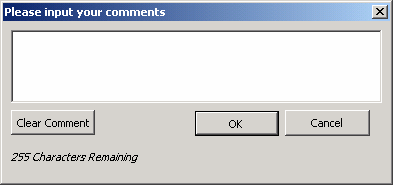 There always seems to be a bit of debate about TM1 and text. TM1 is built for number crunching rather than being a text database but companies often need to store variance or budget commentry in their TM1 database.
 A TM1 cell can hold 255 characters but editing of that text in Excel can prove frustrating to users as they will need to re-type everything.
To make this easier for users I put together this simple vba form with the code below. Basically if the users clicks on a Light Green coloured cell, a vba form as per above will show. They can then edit existing text or enter new text and upon pressing OK the vba will DB send the text to TM1. I tried to make the code as generic as possible so it will decipher any TM1 formula. At the moment though every reference in the formula will need to be a range rather than a hard coded element name
e.g. $A$1 rather than "Jan".
The code in blue goes as an event to the worksheet. The code in red goes behind the form.
It should be pretty easy to replicate the form or I can email an example through.
Apologies that I can't figure out how to indent my code easily in html.
Private Sub Worksheet_SelectionChange(ByVal Target As Range)
If Target.Interior.ColorIndex = 35 Then
Load inputWindow
inputWindow.Show
End If
End Sub
Option Explicit
'********************************************************************************
'** J.WAKEFIELD
'** Counter of characters
'********************************************************************************
Sub CountDown(ByVal inCounter As Integer)
' make sure comment is not more then 256 characters long
Dim intCounter As Integer
Application.DisplayStatusBar = True
Application.StatusBar = (255 - inCounter) & " Characters Remaining"
Me.lblCharacters.Caption = (255 - inCounter) & " Characters Remaining"
End Sub
'********************************************************************************
'** J.WAKEFIELD
'** Cancel button
'********************************************************************************
Private Sub btnCancel_Click()
'close window with out sending information
inputWindow.Hide
Unload inputWindow
Application.StatusBar = ""
End Sub
'********************************************************************************
'** J.WAKEFIELD
'** Clear text
'********************************************************************************
Private Sub btnClear_Click()
txtComments.Value = ""
End Sub
'********************************************************************************
'** J.WAKEFIELD
'** Create variables to use to send
'********************************************************************************
Private Sub btnOK_Click()
Dim arrFormula() As String, arrDims() As String
Dim strFormula As String, strCube As String
Dim iCommaPos As Integer, iBracketPos As Integer, iNoDims As Integer
Dim i As Integer
'Find Cube name
strFormula = ActiveCell.Formula
iBracketPos = InStr(strFormula, "(")
iCommaPos = InStr(strFormula, ",")
'Get cube name
strCube = ActiveSheet.Range(Mid(strFormula, iBracketPos + 1, iCommaPos - iBracketPos - 1)).Value
'Split formula by commas
arrFormula = Split(strFormula, ",", -1, vbTextCompare)
ReDim arrDims(UBound(arrFormula()))
' Get range values
For i = 1 To UBound(arrFormula())
If i = UBound(arrFormula()) Then
arrFormula(i) = Left(arrFormula(i), Len(arrFormula(i)) - 1)
End If
arrDims(i) = ActiveSheet.Range(arrFormula(i)).Value
Next i
'Pass array to be evaluated and sent
Call SendComment(strCube, arrDims())
'Clean up
Application.StatusBar = ""
Unload inputWindow
ActiveCell.Calculate
End Sub
'********************************************************************************
'** J.WAKEFIELD
'** TM1 Send comment
'********************************************************************************
Private Sub SendComment(p_strCube As String, p_Formula() As String)
Dim temp As Variant
Dim iMax As Integer
'Find number of dimensions to use correct send formula
iMax = UBound(p_Formula())
Select Case iMax
Case 3
temp = Application.Run("DBSS", txtComments.Value, p_strCube, p_Formula(1), p_Formula(2), p_Formula(3))
Case 4
temp = Application.Run("DBSS", txtComments.Value, p_strCube, p_Formula(1), p_Formula(2), p_Formula(3), p_Formula(4))
Case 5
temp = Application.Run("DBSS", txtComments.Value, p_strCube, p_Formula(1), p_Formula(2), p_Formula(3), p_Formula(4), p_Formula(5))
Case 6
temp = Application.Run("DBSS", txtComments.Value, p_strCube, p_Formula(1), p_Formula(2), p_Formula(3), p_Formula(4), p_Formula(5), p_Formula(6))
Case 7
temp = Application.Run("DBSS", txtComments.Value, p_strCube, p_Formula(1), p_Formula(2), p_Formula(3), p_Formula(4), p_Formula(5), p_Formula(6), p_Formula(7))
Case 8
temp = Application.Run("DBSS", txtComments.Value, p_strCube, p_Formula(1), p_Formula(2), p_Formula(3), p_Formula(4), p_Formula(5), p_Formula(6), p_Formula(7), p_Formula(8))
Case 9
temp = Application.Run("DBSS", txtComments.Value, p_strCube, p_Formula(1), p_Formula(2), p_Formula(3), p_Formula(4), p_Formula(5), p_Formula(6), p_Formula(7), p_Formula(8), p_Formula(9))
Case 10
temp = Application.Run("DBSS", txtComments.Value, p_strCube, p_Formula(1), p_Formula(2), p_Formula(3), p_Formula(4), p_Formula(5), p_Formula(6), p_Formula(7), p_Formula(8), p_Formula(9), p_Formula(10))
Case 11
temp = Application.Run("DBSS", txtComments.Value, p_strCube, p_Formula(1), p_Formula(2), p_Formula(3), p_Formula(4), p_Formula(5), p_Formula(6), p_Formula(7), p_Formula(8), p_Formula(9), p_Formula(10), p_Formula(11))
Case 12
temp = Application.Run("DBSS", txtComments.Value, p_strCube, p_Formula(1), p_Formula(2), p_Formula(3), p_Formula(4), p_Formula(5), p_Formula(6), p_Formula(7), p_Formula(8), p_Formula(9), p_Formula(10), p_Formula(11), p_Formula(12))
Case 13
temp = Application.Run("DBSS", txtComments.Value, p_strCube, p_Formula(1), p_Formula(2), p_Formula(3), p_Formula(4), p_Formula(5), p_Formula(6), p_Formula(7), p_Formula(8), p_Formula(9), p_Formula(10), p_Formula(11), p_Formula(12), p_Formula(13))
Case 14
temp = Application.Run("DBSS", txtComments.Value, p_strCube, p_Formula(1), p_Formula(2), p_Formula(3), p_Formula(4), p_Formula(5), p_Formula(6), p_Formula(7), p_Formula(8), p_Formula(9), p_Formula(10), p_Formula(11), p_Formula(12), p_Formula(13), p_Formula(14))
Case 15
temp = Application.Run("DBSS", txtComments.Value, p_strCube, p_Formula(1), p_Formula(2), p_Formula(3), p_Formula(4), p_Formula(5), p_Formula(6), p_Formula(7), p_Formula(8), p_Formula(9), p_Formula(10), p_Formula(11), p_Formula(12), p_Formula(13), p_Formula(14), p_Formula(15))
Case 16
temp = Application.Run("DBSS", txtComments.Value, p_strCube, p_Formula(1), p_Formula(2), p_Formula(3), p_Formula(4), p_Formula(5), p_Formula(6), p_Formula(7), p_Formula(8), p_Formula(9), p_Formula(10), p_Formula(11), p_Formula(12), p_Formula(13), p_Formula(14), p_Formula(15), p_Formula(16))
End Select
'Catch Errors
If temp = "KEY_ERR*" Then
MsgBox "An error occurred sending comment, please contact your TM1 administrator", vbCritical, "TM1"
End If
End Sub
'********************************************************************************
'** J.WAKEFIELD
'** Keep track of count
'********************************************************************************
Private Sub txtComments_KeyUp(ByVal KeyCode As MSForms.ReturnInteger, ByVal Shift As Integer)
CountDown Len(txtComments.Value)
End Sub
'********************************************************************************
'** J.WAKEFIELD
'** Display original comment
'********************************************************************************
Private Sub UserForm_Activate()
txtComments.Value = ActiveCell.Value
CountDown Len(txtComments.Value)
End Sub
Wednesday, November 22, 2006
Printing TM1 Excel Reports

Initially when I started creating TM1 reports in Excel I use to always change the page setup for printing to be either Fit to 1 page wide by 1 page tall or adjust the % until it looked right.
Nowadays I find it a lot easier to select fit to 1 page wide but blank out the page tall setting.
This
I find makes things a lot easier and more flexible.
Sunday, November 19, 2006
TM1 Application and Architecture Audit
You can download a pdf by the Applix Centre of Excellence here:
https://www.applix.com/includes/dnldtrkr.asp?tbl=content_document&loc=http://ftp.applix.com/Attachments\00\00\00\42\content_document_4286_ApplixAuditChecklist.pdf&id=4286
It gives a checklist of things you should do on your TM1 server to snsure its running at its best.
https://www.applix.com/includes/dnldtrkr.asp?tbl=content_document&loc=http://ftp.applix.com/Attachments\00\00\00\42\content_document_4286_ApplixAuditChecklist.pdf&id=4286
It gives a checklist of things you should do on your TM1 server to snsure its running at its best.
Wednesday, November 15, 2006
XRU Files Tip

I find TM1 Rule worksheets (XRUs) as the best place to write my rule files.
They allow for easy formatting and commenting for your rules.
One other advantage is that you can keep backups of your rules by just copying your worksheet. This allows you to change your rules, test them out and if it all turns to custard, revert to the backup.
You can also have multiple worksheets within the workbook for different scenarios e.g. a rule to save for the Forecast and a rule to save for Budget time.
Monday, November 13, 2006
WildcardFileSearch
I have been testing the new Applix recommended practice below:
http://www.applix.com/rp/TurboIntegrator_Process_Logging.htm
and its been working really well. What I think needs adding though is an indicator of whether there was any errors in the process.
I'm thinking the TI function below may do the trick but will need some testing:
WildcardFileSearch( Pathname, PriorFilename);
I should be able to search for any files with my TI process name and then return that to my zLogging cube. Worth a go I reckon.
http://www.applix.com/rp/TurboIntegrator_Process_Logging.htm
and its been working really well. What I think needs adding though is an indicator of whether there was any errors in the process.
I'm thinking the TI function below may do the trick but will need some testing:
WildcardFileSearch( Pathname, PriorFilename);
I should be able to search for any files with my TI process name and then return that to my zLogging cube. Worth a go I reckon.
MDX, Dynamic Subsets and Server Crashes
I recently got asked to look at a site that was experiencing TM1 server crashes.
I had a look and found that on an MDX report that ran in Excel, it was referencing a dynamic subset. This dynamic subset was producing empty results due to changes in their structure.
Essentially whenever they ran this Excel MDX report it would crash the server instantly. As soon as I fixed the Dynamic Subset, the MDX report worked fine and the server is stable again.
I guess the lesson is to check that your dynamic subsets are never producing empty results.
I had a look and found that on an MDX report that ran in Excel, it was referencing a dynamic subset. This dynamic subset was producing empty results due to changes in their structure.
Essentially whenever they ran this Excel MDX report it would crash the server instantly. As soon as I fixed the Dynamic Subset, the MDX report worked fine and the server is stable again.
I guess the lesson is to check that your dynamic subsets are never producing empty results.
Friday, November 10, 2006
TM1 Certification???
I notice Microsoft is introducing a BI certification which led me to wonder shouldn't Applix introduce some sort of certification program to prove that TM1 people have proven skills????
Just a random thought....
Just a random thought....
Wednesday, November 08, 2006
TM1 8.4.5
It looks like version 845 was released on monday 6/11/06
Two things that stand out for me are the enhanced message logging capabilities and the ability to allow feeders to load using multiple hyper-threads which should result in quicker load times.
I would imagine these will be included in V9 SP3 which will hopefully be out before the end of the year.
Two things that stand out for me are the enhanced message logging capabilities and the ability to allow feeders to load using multiple hyper-threads which should result in quicker load times.
I would imagine these will be included in V9 SP3 which will hopefully be out before the end of the year.
Loose File Installs
I was a bit worried that from version 9 it wouldn't be possible to do loose files upgrades but on the Applix documentation website there is now a full guide to doing client upgrades:
http://www.applix.com/support/documentation.asp
http://www.applix.com/support/documentation.asp
Tuesday, November 07, 2006
Protecting worksheets...
One feature that I find very useful when building applications is the ability to protect only the user interface.
I.e.
Sub Protect_sheet(S As Worksheet)
S.Protect UserInterFaceOnly:=True
End Sub
This is incredibly handy as it enables us to make modifications to worksheets via vba (without having to toggle sheet protection off and on all of the time).
I.e.
Sub Protect_sheet(S As Worksheet)
S.Protect UserInterFaceOnly:=True
End Sub
This is incredibly handy as it enables us to make modifications to worksheets via vba (without having to toggle sheet protection off and on all of the time).
Workbook Events VBA
There are 2 events at least people need to capture in TM1 frontends:
1) Stop the delete key so people don't delete the DBRW formula
2) Stop an F9 and instead do a shift plus f9
The code below in the workbook events module will help with this.
Private Sub Workbook_BeforeClose(Cancel As Boolean)
Application.OnKey "{DELETE}"
Application.OnKey "{F9}"
End Sub
Private Sub Workbook_Open()
Application.OnKey "{DELETE}", "delKey"
Application.OnKey "{F9}", "+{F9}"
End Sub
Sub delKey()
MsgBox "The delete key has been disabled. Please use the space bar instead", vbExclamation
End Sub
1) Stop the delete key so people don't delete the DBRW formula
2) Stop an F9 and instead do a shift plus f9
The code below in the workbook events module will help with this.
Private Sub Workbook_BeforeClose(Cancel As Boolean)
Application.OnKey "{DELETE}"
Application.OnKey "{F9}"
End Sub
Private Sub Workbook_Open()
Application.OnKey "{DELETE}", "delKey"
Application.OnKey "{F9}", "+{F9}"
End Sub
Sub delKey()
MsgBox "The delete key has been disabled. Please use the space bar instead", vbExclamation
End Sub
Excel Hidden Sheets
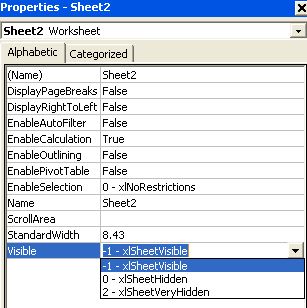
If you want to hide worksheets from users (maybe some lookup ranges for use in drop downs) then you can set the visible property in the VBE (Alt+F11).
Sunday, November 05, 2006
TM1 and Excel Insert Function
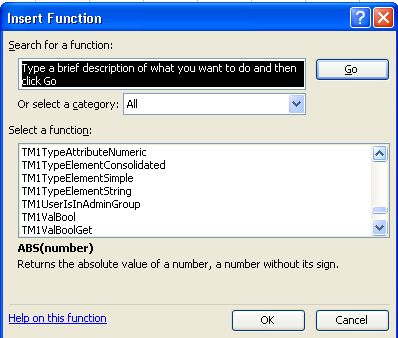
I quite often use the Excel Insert Function (fx button) to quickly create TM1 Excel formulas.
Normally I just select the TM1 category from the drop down list but you may notice that if you have All selected and scroll down the list of available functions you will find a whole load of other TM1 functions.
They all seem to be something to do with the API but you never know there may be something useful in there.....
Friday, November 03, 2006
TM1 Naming Standards
Everyone had their own naming standards for cubes, dimensions etc but I have a few that I try to stick to when building applications
1) Don't use Month and Year as dimension names because these are reserved words in TI and it gets frustrating having to rename your variables each time. I tend to use Period and FiscalYear for GL type data.
2) Try not to have spaces in your names. Instead use underscores or capitalisation.
3) Don't name your dimensions the same as your cube e.g. a cube called Programmes with a dimension called Programmes
4) Make the names of the dimensions meaningful to users. Do not use Relational table column names.
5) Almost every cube you create will have a Measures dimension. Try to have the dimensions with a naming standard e.g. GL_Values, HR_Values
It would be useful if other people comment their ideas for naming standards as well.
1) Don't use Month and Year as dimension names because these are reserved words in TI and it gets frustrating having to rename your variables each time. I tend to use Period and FiscalYear for GL type data.
2) Try not to have spaces in your names. Instead use underscores or capitalisation.
3) Don't name your dimensions the same as your cube e.g. a cube called Programmes with a dimension called Programmes
4) Make the names of the dimensions meaningful to users. Do not use Relational table column names.
5) Almost every cube you create will have a Measures dimension. Try to have the dimensions with a naming standard e.g. GL_Values, HR_Values
It would be useful if other people comment their ideas for naming standards as well.
Tuesday, October 31, 2006
TM1 .blb files
Within your TM1 data directory you may find some files with the extension .blb
These files actually store the formatting of your .rux files.
e.g.
If you maintain your rules in backend TM1 (rather than Excel worksheets) then you may have GL.cub and a GL.rux
If you format the text in the .rux to be font size 12 and blue than a GL.blb will appear storing that formatting. Sometimes you may create one without realising it though.
I actually find blb files to be a bit annoying and I have had issues with them, so I tend to delete when I see them.
Personally I think rules are easier to maintain in Excel worksheets but I occasionally use backend rule files on my control cube rules.
These files actually store the formatting of your .rux files.
e.g.
If you maintain your rules in backend TM1 (rather than Excel worksheets) then you may have GL.cub and a GL.rux
If you format the text in the .rux to be font size 12 and blue than a GL.blb will appear storing that formatting. Sometimes you may create one without realising it though.
I actually find blb files to be a bit annoying and I have had issues with them, so I tend to delete when I see them.
Personally I think rules are easier to maintain in Excel worksheets but I occasionally use backend rule files on my control cube rules.
Sunday, October 29, 2006
Transaction Log
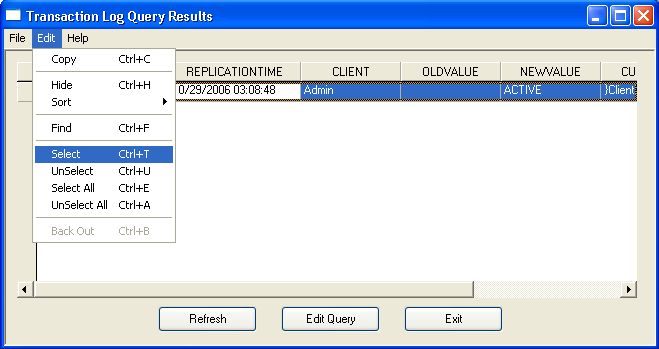
Something that may not be obvious when you want to back out some transactions is that you have to select the transactions first.
Select the transaction you want to back out and go Edit > Select. The transaction will then have a tick against it. Once a transaction has a tick against it the Back Out option on the edit menu will become available.
Thursday, October 26, 2006
Alternative to SUBNM
If you want a user to select an element from a TM1 dimension from your Excel front end then you can use a SUBNM and get a user to double click the cell or....
put a transparent text box over the subnm cell and assign a macro like this
Sub Dept()
Sheets("Menu").Range("Dept").Select
Application.Run Range("[tm1.xla]tm1!ENTER")
End Sub
This allows a user to only single click to get to the subset editor.
put a transparent text box over the subnm cell and assign a macro like this
Sub Dept()
Sheets("Menu").Range("Dept").Select
Application.Run Range("[tm1.xla]tm1!ENTER")
End Sub
This allows a user to only single click to get to the subset editor.
Wednesday, October 25, 2006
New Recommend Practice Article
There is an interesting new post on the recommended practices website about logging info on TI processes:
http://www.applix.com/rp/TurboIntegrator_Process_Logging.htm
I like it but would prefer it if more of this stuff was inbuilt in the application.
For example on error, email the dba.
I realise Paul Simon's API can program this but its so much neater and easier if its inbuilt.
http://www.applix.com/rp/TurboIntegrator_Process_Logging.htm
I like it but would prefer it if more of this stuff was inbuilt in the application.
For example on error, email the dba.
I realise Paul Simon's API can program this but its so much neater and easier if its inbuilt.
Tuesday, October 24, 2006
Free Reporting Services Control - Update
Well I have got it working after a bit of investigating round the web.
The trick was to issue an MDX statement and return it to a Dataset which was then used in the report.
So you need a bit of techie knowledge but I think it will achieve what i was after, in terms of a free web reporting capability for TM1 based off MDX.
MDX gives you so much control over the data that its great for reporting.
Hopefully I'll get round to documenting the whole process this week and post on the Applix forum.
The trick was to issue an MDX statement and return it to a Dataset which was then used in the report.
So you need a bit of techie knowledge but I think it will achieve what i was after, in terms of a free web reporting capability for TM1 based off MDX.
MDX gives you so much control over the data that its great for reporting.
Hopefully I'll get round to documenting the whole process this week and post on the Applix forum.
Saturday, October 21, 2006
Free Reporting Services Control
On the Visual Web Developer website you can now download a control that effectively gives you reporting services capability for free:
http://msdn.microsoft.com/vstudio/express/vwd/download/
I have used the full reporting services successfully against TM1 so I wonder whether I can use this free control as well.
I'll give it a test and let you know.......
http://msdn.microsoft.com/vstudio/express/vwd/download/
I have used the full reporting services successfully against TM1 so I wonder whether I can use this free control as well.
I'll give it a test and let you know.......
Thursday, October 19, 2006
More useful free software
If you need to edit screenshots or pictures for use in your Excel templates or TM1Web than the best thing to use is Irfanview.
Download here http://www.irfanview.com/
Download here http://www.irfanview.com/
Wednesday, October 18, 2006
Traffic Lighting
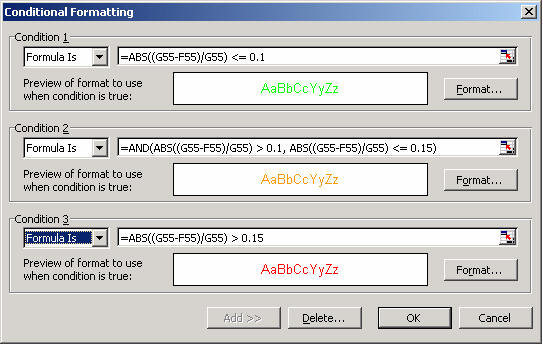
Sometimes people like to see traffic lighting as indictors of performance on reports. One easy way to do this in Excel is using Webdings and conditional formatting.
1. Type n into the cell you wish to have traffic lights on
2. format the cell to be Webdings (this will show a circle)
3. Apply conditional formatting using the picture as a guide.
Tuesday, October 17, 2006
Subset Cut and Paste
In the subset editor you can change the order of elements by dragging and dropping the elements.
Sometimes this can be a little awkward though and I actually find it easier to right click the element, select cut, and then use the Paste above (or below) option to get the elements in the order that I require.
Sometimes this can be a little awkward though and I actually find it easier to right click the element, select cut, and then use the Paste above (or below) option to get the elements in the order that I require.
TM1 LDAP
I find LDAP authentication quite easy to setup on TM1 with just the following cfg parameters:
IntegratedSecurityMode=2
PasswordSource=LDAP
LDAPPort=
LDAPHost=
LDAPSearchBase=
LDAPSearchField=
LDAPWellKnownUserName=
LDAPWellKnownPassword=
I find that if I have this setup though I can't use the admin account because it's not an LDAP account. Unless I'm missing something, its a shame that the TM1 admin account is not excluded from this rule.
IntegratedSecurityMode=2
PasswordSource=LDAP
LDAPPort=
LDAPHost=
LDAPSearchBase=
LDAPSearchField=
LDAPWellKnownUserName=
LDAPWellKnownPassword=
I find that if I have this setup though I can't use the admin account because it's not an LDAP account. Unless I'm missing something, its a shame that the TM1 admin account is not excluded from this rule.
Friday, October 13, 2006

Useful software when working with TM1
These useful (and most importantly free) pieces of software below are really useful when working on a TM1 project.
http://www.primopdf.com/
Allows you to write to pdf. Great for User guides or using in the TM1 report manager.
http://www.foxitsoftware.com/pdf/rd_intro.php
Allows you to read pdf files and no install required. Means you don't need adobe with the annoying popups. Need it to read the TM1 manuals
http://www.toadsoft.com/
Database querying tool. A must for when you hook up TM1 to oracle and is better than SQL enterprise manager when viewing sql databases.
http://www.primopdf.com/
Allows you to write to pdf. Great for User guides or using in the TM1 report manager.
http://www.foxitsoftware.com/pdf/rd_intro.php
Allows you to read pdf files and no install required. Means you don't need adobe with the annoying popups. Need it to read the TM1 manuals
http://www.toadsoft.com/
Database querying tool. A must for when you hook up TM1 to oracle and is better than SQL enterprise manager when viewing sql databases.
Thursday, October 12, 2006
TM1Web & Drawing Objects
Be careful with your use of the drawing toolbar if you are publishing to TM1Web.
Not all of the components will be supported.
One that is definately not supported at the moment is the shading option, these objects will just disappear on the web.
Not all of the components will be supported.
One that is definately not supported at the moment is the shading option, these objects will just disappear on the web.
Wednesday, October 11, 2006
TM1 Indents
One thing I keep hoping Applix will do is to putting hierarchy indenting into the cube viewer. It should also be automatic within dynamic slices.
If you look at xlcubed or Temtec (which Applix just purchased) they always show the hierarchy as indented when you drill down on consolidations.
The InSpreadsheetBrowser has been doing it for years and I'm sure every user would like to see it in the cube browser and when they slice a view out to excel
If you look at xlcubed or Temtec (which Applix just purchased) they always show the hierarchy as indented when you drill down on consolidations.
The InSpreadsheetBrowser has been doing it for years and I'm sure every user would like to see it in the cube browser and when they slice a view out to excel
Tuesday, October 10, 2006
TM1 and Dates
I find the best way to store dates in TM1 is by using numeric elements rather than string.
If you use numeric elements then the figure will be stored the way excel stores dates e.g. 38991
You can then format this figure so that it appears like 01/10/2006 in Excel through cell formatting and backend in TM1 through element formatting.
Storing them this way makes it a lot easier to minus or add dates to each other.
If you use numeric elements then the figure will be stored the way excel stores dates e.g. 38991
You can then format this figure so that it appears like 01/10/2006 in Excel through cell formatting and backend in TM1 through element formatting.
Storing them this way makes it a lot easier to minus or add dates to each other.
VBA - Modules
You can actually drag and drop modules, forms and class modules between your excel workbooks in the Visual Basic Editor.
Lot easier than exporting and importing.
Lot easier than exporting and importing.
Sunday, October 08, 2006
Saturday, October 07, 2006
Referencing Subsets in TM1 formulas...
One handy feature of TM1 is the ability to reference not only elements but also subset names in TM1 formulas.
For example, if we have the subset called "Fast Cars" (on a cars dimension), which contains the elements "Porsche" and "Ferrari," we can pass our DBRW formula the actual name of the subset (instead of the individual element names).
That is:
=DBRW("tm1server:Cars", "2007","Fast Cars", "New Zealand","Car Numbers")
Instead of:
=DBRW("tm1server:Cars", "2007","Porche", "New Zealand","Car Numbers")
This will give us a rollup of the 2007 Car numbers for both Porsche and Ferrari in New Zealand.
I have found this feature to be incredibly powerful, especially when filtering is applied to the subset based on an attribute value.
Notes:
- Be weary of referencing subsets containing both consolidated elements and their children, as values will be counted multiple times
- Subsets cannot be referenced as elements in MDX queries
For example, if we have the subset called "Fast Cars" (on a cars dimension), which contains the elements "Porsche" and "Ferrari," we can pass our DBRW formula the actual name of the subset (instead of the individual element names).
That is:
=DBRW("tm1server:Cars", "2007","Fast Cars", "New Zealand","Car Numbers")
Instead of:
=DBRW("tm1server:Cars", "2007","Porche", "New Zealand","Car Numbers")
This will give us a rollup of the 2007 Car numbers for both Porsche and Ferrari in New Zealand.
I have found this feature to be incredibly powerful, especially when filtering is applied to the subset based on an attribute value.
Notes:
- Be weary of referencing subsets containing both consolidated elements and their children, as values will be counted multiple times
- Subsets cannot be referenced as elements in MDX queries
Expand Above

If you want your hierarchies to operate downwards (consolidations at the bottom like the way you would layout an Excel spreadsheet) then use the Expand Above option.
Worth mentioning that in your subsets it will remember the options you choose.
e.g. turn on the alias, TM1 will always show the alias, turn on Expand Above the subset will keep the epand above.
TM1 Pick

If you have a template for your reports with Corporate colours and layouts etc then instead of starting with a slice and formatting it, you probably start with a worksheet and add TM1 formulas to it.
In this case the TM1 Pick function becomes very useful .
By right clicking on a cube or dimension it copies the server:cubename or server:dimension to the clipboard. This can then be pasted into your excel worksheet and you then create your DBRW formulas.
Its especially useful if your typing/spelling isn't too good!
Thursday, October 05, 2006
Yet Another Excel Tip
Press "ctrl + ~" to toogle between formulas and cell values in Excel... I find this really useful when working with a large worksheet full of TM1 formulas.
TM1 Recommended Practices Repository
If you haven't seen the TM1 Recommended Practices Repository then do have a look as there are some really useful articles there.
http://www.applix.com/rp/tm1_recommended_practices.htm
I would recommend:
http://www.applix.com/rp/tm1_recommended_practices.htm
I would recommend:
- Protecting TM1 Excel Data Entry Templates and Reports
- Using Conditional Formatting to Identify Editable Cells in TM1 Spreadsheets
- Using MDX Parameters in Dynamic Subsets
TM1 Bug Tracking
No TM1 project is without a few bugs.
I recommed using one of the free bug tracking websites avilable to track them between your team.
http://www.basecamphq.com/
http://getbugjuice.com/
http://16bugs.com/
I recommed using one of the free bug tracking websites avilable to track them between your team.
http://www.basecamphq.com/
http://getbugjuice.com/
http://16bugs.com/
TM1, OLAPOBJECTS & XCELSIUS
Great to see OlapObjects have announced integration of Xcelsiusinto their web product offering.
Version 5 was looking cool when I played with the demo.
www.olapobjects.com/
I wrote an article on the xcelsius website showing how anyone can hook up Xcelsius to live TM1 data here:
http://www.bobjects.com/email_imp/partners/nl_xcelsius/article5.html
You can also do extracts from TI to xml and then show in Xcelsius for live dashboarding.
Version 5 was looking cool when I played with the demo.
www.olapobjects.com/
I wrote an article on the xcelsius website showing how anyone can hook up Xcelsius to live TM1 data here:
http://www.bobjects.com/email_imp/partners/nl_xcelsius/article5.html
You can also do extracts from TI to xml and then show in Xcelsius for live dashboarding.
TM1 & TEMTEC Initial Thoughts
I was really surprised and excited when Applix bought Temtec.
It follows the consolidation of the BI market trend e.g. Microsoft buying Proclarity
The thing I always loved about Temtec was the speed. Its the fastest web product that I've seen.
It also had the best printing capability I've seen of an OLAP web product.
It relies on a small client install through the web browser though.
Be interesting to see how they integrate TM1Web with Temtec.
Temtec is great for adhoc querying but relies on ODBO for writeback so I expect them to put some heavy work into making Temtec integrate with the TM1 API.
It follows the consolidation of the BI market trend e.g. Microsoft buying Proclarity
The thing I always loved about Temtec was the speed. Its the fastest web product that I've seen.
It also had the best printing capability I've seen of an OLAP web product.
It relies on a small client install through the web browser though.
Be interesting to see how they integrate TM1Web with Temtec.
Temtec is great for adhoc querying but relies on ODBO for writeback so I expect them to put some heavy work into making Temtec integrate with the TM1 API.
The History of TM1
Check out this webpage for an interesting histroy of TM1
http://www.vectorspace.com/2006/08/08/tm1-origins-i
http://www.vectorspace.com/2006/08/08/tm1-origins-i
Monday, October 02, 2006
Excel Dashboard
If your looking for some nice ways to do dashboaring in Excel or maybe TM1Web then this website gives some ideas:
http://www.excelling.it/excel/dashboard_en.asp
http://www.excelling.it/excel/dashboard_en.asp
Bullets and Sparklines
Ther's a few BI tools saying they can do fancy graphs like Sparkline sand Bullet Graphs but ExcelUser shows you how you can do them in Excel and therefore dynamically off TM1 data.
http://www.exceluser.com/explore/bullet.htm
http://www.exceluser.com/dash/sparkintro.htm
There may be a small fee involved in some of them.
http://www.exceluser.com/explore/bullet.htm
http://www.exceluser.com/dash/sparkintro.htm
There may be a small fee involved in some of them.
Citrix cfg parameter
In verision 9 SP2 you can use a new parameter ReceiveProgressResponseTimeoutSecs=20.
As I understand it Citrix can time out a TM1 session unless you put this parameter in so I would rather have it than not.
As I understand it Citrix can time out a TM1 session unless you put this parameter in so I would rather have it than not.
Default Subsets
I prefer not to have dynamic subsets as my default subset due to the annoying alerts that pop up to users.
To get round this I create a dynamic subset and then base my default subset off it in my load process.
So in my TI process that loads the departments I place this code in the epilog:
SubsetDeleteAllElements('Product', 'Default');
x = 1;
While(x <= SubsetGetSize('Product', 'CORPPRODUCT'));
vElement = SubsetGetElementName('Product', 'CORPPRODUCT', x);
SubsetElementInsert('Product', 'Default', vElement, x);
x = x + 1;
END;
It loops round the dynamic subset called CORPRODUCT and recreates the default subset from it.
The code to produce the dymanic subset is:
{TM1DRILLDOWNMEMBER( {[PRODUCT].[CORPPRODUCT]}, ALL, RECURSIVE )}
You can exchange the name CORPPRODUCT for your top level element you want to drill down on.
To get round this I create a dynamic subset and then base my default subset off it in my load process.
So in my TI process that loads the departments I place this code in the epilog:
SubsetDeleteAllElements('Product', 'Default');
x = 1;
While(x <= SubsetGetSize('Product', 'CORPPRODUCT'));
vElement = SubsetGetElementName('Product', 'CORPPRODUCT', x);
SubsetElementInsert('Product', 'Default', vElement, x);
x = x + 1;
END;
It loops round the dynamic subset called CORPRODUCT and recreates the default subset from it.
The code to produce the dymanic subset is:
{TM1DRILLDOWNMEMBER( {[PRODUCT].[CORPPRODUCT]}, ALL, RECURSIVE )}
You can exchange the name CORPPRODUCT for your top level element you want to drill down on.
Thursday, September 21, 2006
PrivilegeGenerationOptimization=T
I had a lot of success recently putting this paramter into the TM1 cfg file.
A security refresh used to take 20mins but by adding this parameter and feeding everything correctly it reduced to 3minutes. Well worth it.
A security refresh used to take 20mins but by adding this parameter and feeding everything correctly it reduced to 3minutes. Well worth it.
Tuesday, September 19, 2006
Drill Thru Tip
When creating a drill through process you will most likely need to do some coding in the Prolog section of the TI process.
If a user does a drill on an element which shows an alias you will probably need to convert this name back into a code which the underlying database system recognises to use in a SQL statement.
I therefore use a DIMIX and DIMNM formula to return the element.
e.g. Costcentre = DIMNM('Costcentre', DIMIX('Costcentre', Costcentre));
If a user does a drill on an element which shows an alias you will probably need to convert this name back into a code which the underlying database system recognises to use in a SQL statement.
I therefore use a DIMIX and DIMNM formula to return the element.
e.g. Costcentre = DIMNM('Costcentre', DIMIX('Costcentre', Costcentre));
} Cubes
If you want to hide a TM1 cube from a normal user you can easily just name it with a } at the front.
It will then be treated as a control object and only viewable if you select the option to see them.
It will then be treated as a control object and only viewable if you select the option to see them.
Monday, September 18, 2006
TM1Web Recalculate
Something that may not be obviuos but I think very important is that the recalculate button in TM1Web does the equivilant of F9, so if you have a large spredsheet you may get slow performance. Would seem to me to be best to split everything into seperate workbook with hyperlinks.
Dimension Editor Wierd Behaviour
I recently saw this happen in v9 SP2.
Go into the dimension editor, change a consolidation weighting from 1 to -1 and press save.
I have seen this fail if you have an alias on and also if you highlight 1 press delete and then type -1.
Go into the dimension editor, change a consolidation weighting from 1 to -1 and press save.
I have seen this fail if you have an alias on and also if you highlight 1 press delete and then type -1.
Tuesday, February 21, 2006
MDX Intro PDF
The link below is for a chapter sampler of Chriss Webb's new MDX book. The sampler is a really useful intro for people interested in learning mdx.
http://www.wiley.com/WileyCDA/WileyTitle/productCd-0471748080.html
http://media.wiley.com/product_data/excerpt/80/04717480/0471748080.pdf
http://www.wiley.com/WileyCDA/WileyTitle/productCd-0471748080.html
http://media.wiley.com/product_data/excerpt/80/04717480/0471748080.pdf
Data Visualisation Podcast
This link is a podcast of Nigel Pendse (author of OlapReport) talking about best techniques for Data visualisation.
Worth listening to if you are designing graphs off your TM1 data.
http://www.olapreport.com/podcast/Visualization.mp3
Worth listening to if you are designing graphs off your TM1 data.
http://www.olapreport.com/podcast/Visualization.mp3
Monday, February 06, 2006
843 Rule Worksheets
There is a bug in 843 where if you have an error in your rule worksheet then the meesage box tells you the wrong line number for the error.
This is fixed in 9.0
This is fixed in 9.0
Subscribe to:
Posts (Atom)